Читать эту страницу по-русски
Diese Seite auf Deutsch lesen
Leer esta página en español

The school planner that keeps up with your timetable.

Every class and every deadline in one app. If your school runs A/B weeks — or any cycle up to four — Weeklie tracks which one you're in. Today's lessons sit on your home screen, so most days you don't open it.


  • 2014shipping since
  • 12app languages
  • Offlineno Wi-Fi needed
  • Freeno account
This week Week A
Mon
Maths 09:00 · 204
German 11:00
Physics 12:00
Tue
English 09:00
Physics 10:00 · Lab 1
Art 14:00
Wed
Chemistry 09:00 · Lab 3
Music 11:00
Biology 13:00
Thu
History 09:00
Art 10:00
Maths 12:00 · 204
Fri
Maths 09:00
Biology 10:00 · 118
History 13:00

Your school week, at a glance

Today's classes on your home screen, the week you're actually in, and homework with the date it's due. That's the app — there's no onboarding to sit through.
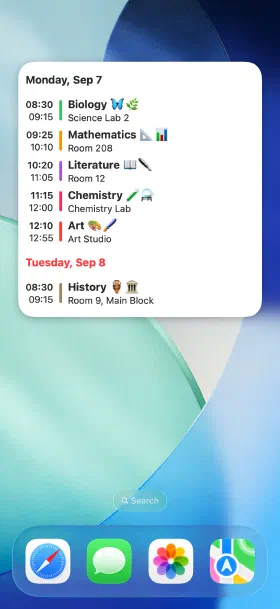
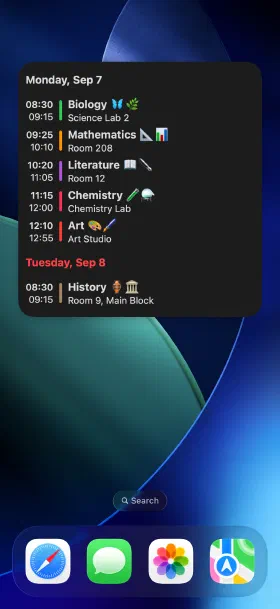
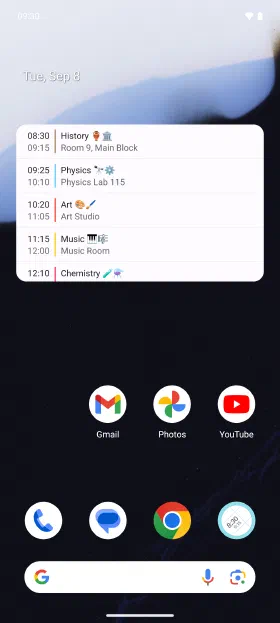
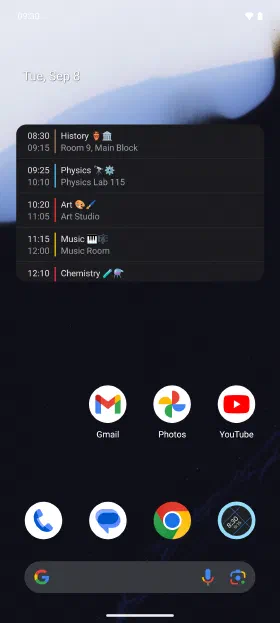
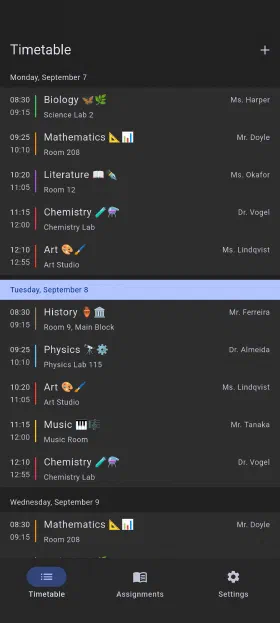
  • Today's lessons on the home screen, without opening the app
    Today's lessons on the home screen, without opening the app
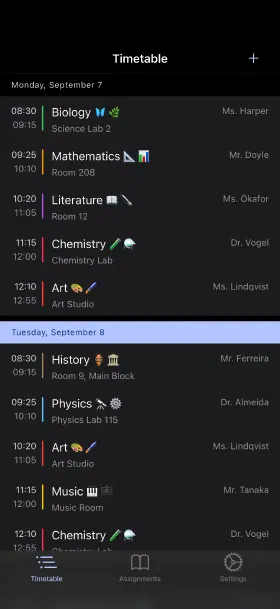
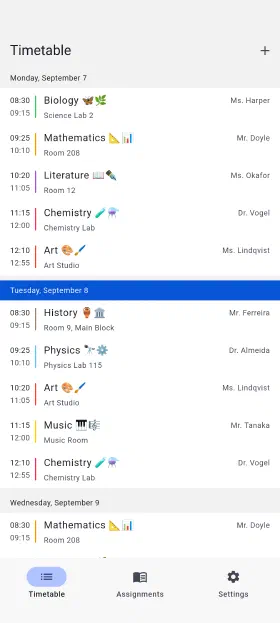
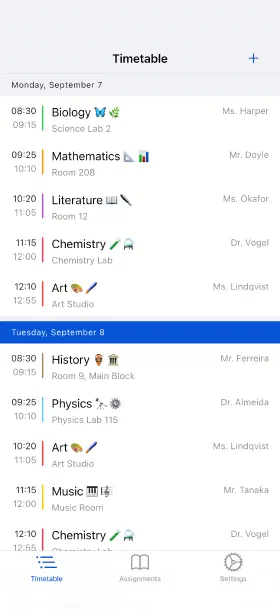
  • The week you're in, with rooms and teachers
    The week you're in, with rooms and teachers
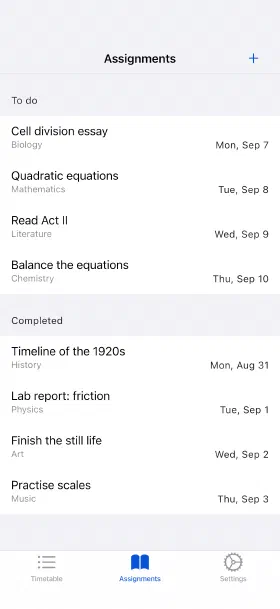
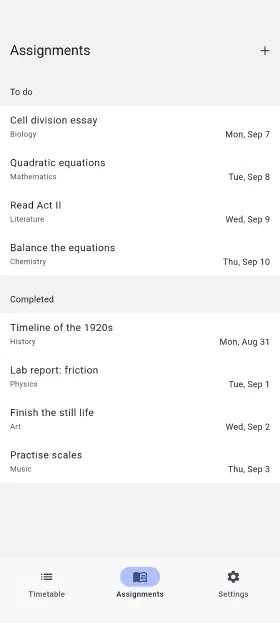
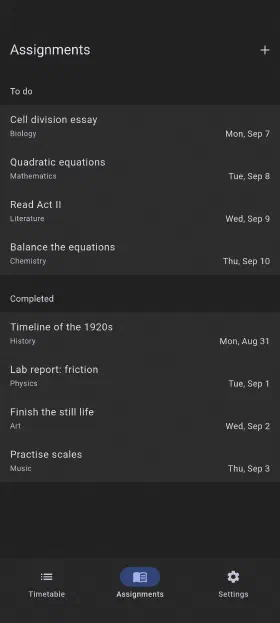
  • Homework with due dates, ticked off when it's done
    Homework with due dates, ticked off when it's done
  • Today's lessons on the home screen, without opening the app
    Today's lessons on the home screen, without opening the app
  • The week you're in, with rooms and teachers
    The week you're in, with rooms and teachers
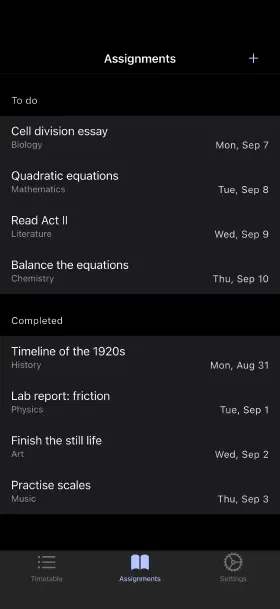
  • Homework with due dates, ticked off when it's done
    Homework with due dates, ticked off when it's done
  • Today's lessons on the home screen, without opening the app
    Today's lessons on the home screen, without opening the app
  • The week you're in, with rooms and teachers
    The week you're in, with rooms and teachers
  • Homework with due dates, ticked off when it's done
    Homework with due dates, ticked off when it's done
  • Today's lessons on the home screen, without opening the app
    Today's lessons on the home screen, without opening the app
  • The week you're in, with rooms and teachers
    The week you're in, with rooms and teachers
  • Homework with due dates, ticked off when it's done
    Homework with due dates, ticked off when it's done

Everything a paper planner can't do

Weeklie was built for timetables that don't repeat neatly — and then given the reminders, homework tracking and widgets a notebook was never going to manage.

  • Alternating weeks, done right

    A/B weeks, or any cycle up to four weeks. Set it up once and Weeklie tracks which week you're in — and if a holiday shifts the pattern, correcting it is one setting.

  • Homework that gets done

    Save every assignment with its due date and tick it off when it's finished. Nothing gets lost between the lesson and the deadline.

  • Reminders that make sense

    A nudge before a class starts, and another before a deadline — set per class and per assignment, so it isn't shouting at you all day. Reminders are part of the one-off purchase.

  • A real home screen widget

    Today's classes at a glance on iOS and Android, plus Apple Watch. Most days you never open the app.

  • Share with your class

    Send your timetable as a file, or share an 8-character code a classmate types in. Nobody retypes the whole semester.

  • Works offline, no account

    Your schedule lives on your device. No sign-up, no email, nothing to lose when the school Wi-Fi drops.

  • Just ask Siri

    "What's my next lesson?" — Siri answers without you opening anything. Today's and tomorrow's classes work the same way.

  • In your language

    Weeklie is fully translated into 12 languages, so it reads like it was made where you are — not run through a translator.

What costs money, and what doesn't

Free, and staying free

Your timetable, cycles up to four weeks, homework and due dates, the home screen widget, Apple Watch, Siri, sharing and export. Paid for by one banner ad.

One payment, once

Reminders before classes and deadlines, photo attachments on assignments, and no ads. No subscription, no renewal, nothing that expires.

Who it's for

School and high school

Weeklie fits timetables that repeat over one to four weeks, including A/B weeks and block scheduling. Save every assignment with its due date so nothing is discovered the night before.

College and university

Built for a timetable that changes week to week. Enter your courses once, keep lecturers and room numbers to hand, and share the semester with your coursemates.

Set up your week in a few minutes

Free on iOS and Android. No account, no sign-up, works offline.

Questions

Does Weeklie handle A/B weeks?
Yes — that’s the reason it exists. You can set up a cycle of up to four recurring weeks, and the app tracks which one you’re in automatically.
What about block scheduling or a longer rotation?
Both work. Weeklie repeats a cycle of one to four whole weeks, so block schedules and A/B, three-week or four-week rotations all fit. A cycle that isn’t a whole number of weeks — a six-day rotation, for example — isn’t supported.
Do I need an account?
No. Weeklie works offline and stores your timetable on your device. There’s nothing to sign up for.
Is it free?
The timetable, homework tracking and the home screen widget are free, with ads. One optional purchase, paid once, removes the ads and unlocks reminders and photo attachments.
Can I move my timetable to a new phone?
Yes — export it as a file and import it on the new device. Sharing with a classmate works the same way, or the app can generate an 8-character code they type in instead.
Which platforms does it run on?
iOS and Android, with home screen widgets on both and an Apple Watch app. Weeklie has been on the App Store since 2014.

Get in touch

Questions, bug reports, or a feature you wish existed — this reaches us directly.